 Many people who have more than one handset . When all the devices require battery charging , they would dither . In addition they also often bothered with cable loops .
And that annoying , all socket at home would be filled with a variety of cell phone charger so you can not use it for other purposes . To overcome this , the charger comes a new generation phones is thingCHARGER .
This tool is claimed to be able to present the charging process easier and neat . The design itself is very simple , similar to a regular outlet on the wall ( wall outlet ) . How to use , just plug in the socket thingCHARGER and you can directly charge the phone at the top of the body .

Citing a long Gizmag , Tuesday ( 03/12/2013 ) , this is basically the same as a docking station for the phone . The difference, thingCHARGER can charge three batteries at the same handsets , such as smartphones , tablet PCs and e -readers .
At the top of the body itself there are ports that could end Diganta changed , according to the device you want refilled . If not enough , at the bottom embedded two USB ports that can be used for charging other devices . However , in this way you have to use a USB cable .
thingCHARGER sold for U.S. $ 29 or U.S. $ 350 thousand , but for now only available in socket models for the North American region . In the future , the model will come with thingCHARGER outlet for other countries .
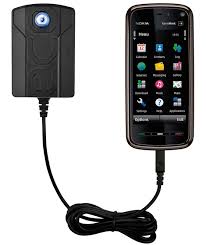 The number of smart phone incident burned and exploded over the past few months , would make anyone wary . If you think the trigger for the use of devices that do not support original , not true .
Despite using the official software components company , if followed by an unwise use of it is not impossible also provoke sparks . Here are some tips you can do to avoid a similar incident from technology experts when contacted Teguh Prasetya , Tuesday ( 09/17/2013 ) :
1 . Create a timer on the plug or power jack ( widely available at electronics stores ) . So , you can set how long it took to cut off the power automatically .
2 . Prior to charge , first make sure the battery is yellow . Do not wait until it is completely depleted ( red ) .
3 . Disconnect or unplug the charger from your device when it is filled with immediately . Usually charging batteries for cell phones takes up to a maximum of three hours . However , back again on the type of the device itself. Where , the greater the capacity the longer the battery charging time is also charged.
4 . If you want to buy an extra charger , make sure the first line with the power needs of the device . For example , the capacity of the battery 2 Ampere then not to charge the battery with a capacity of supporting devices above or below it . It will damage the device .
5 . Do not be lazy to read the user guide on the box or the box the phone . Therefore , there is described a variety of information so that users can better understand the specifications of the device .
" Be wise in using your device . Generally , a battery of electronic devices have age limits , respectively . In short , if conditions begin to decrease the battery life could be a sign that ' leaked ' and time to be replaced , "
